
How to Install a Smart Thermostat Yourself
Part of: Heating and cooling
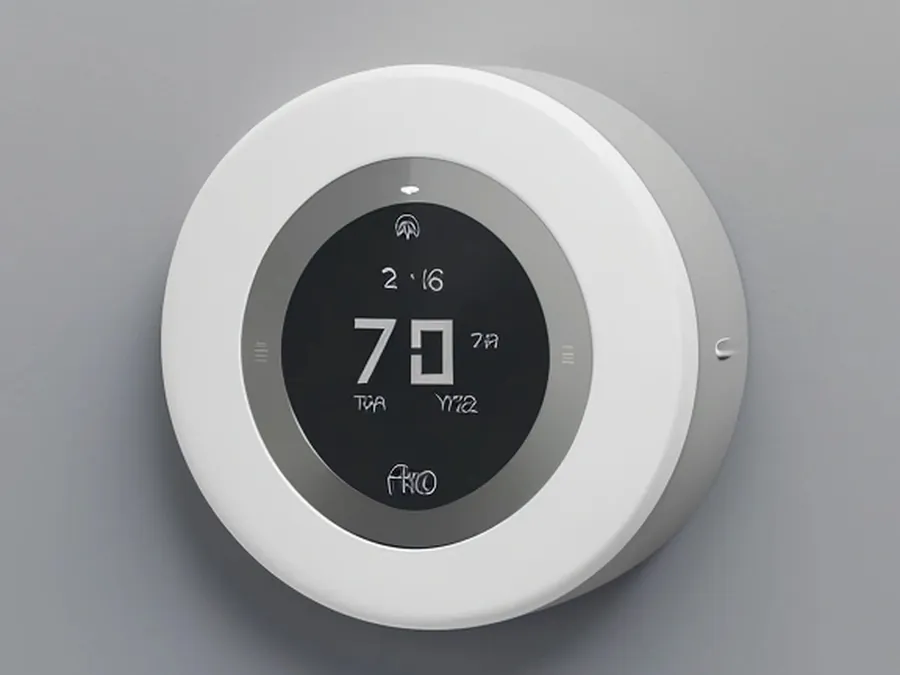
- Difficulty
- Easy to moderate
- Time
- 30 to 60 minutes
- Tools
- Screwdrivers, a non-contact voltage tester, the new thermostat, labels or tape, a drill, your phone
- Call a pro if
- Your system is high voltage or has no common wire and no adapter kit, the wiring looks damaged or confusing, or the system does not respond after installation.
In this guide
- Power off first
A smart thermostat learns your schedule, trims energy waste and lets you adjust the house from your phone. Swapping a standard thermostat is a one hour job on most systems. Here is how to install a smart thermostat step by step.
1. Check compatibility first
1. Confirm your system type: most smart thermostats work with standard 24 volt heating and cooling.
2. High voltage systems, like electric baseboard with thick wires and wire nuts, need a different thermostat.
3. Look for a C wire, the common wire most smart thermostats need for power.
4. No C wire is common; many kits include an adapter, so check before you buy.
2. Turn the power off
1. Switch off the breaker for the furnace and air handler.
2. Adjust the old thermostat and confirm nothing runs.
3. Leave the breaker off until the new base is fully wired.
3. Remove the old thermostat
1. Pop or unscrew the faceplate off the wall plate.
2. Photograph the wiring clearly before touching it.
3. Label each wire with the letter of its terminal using the stickers in the box or tape.
4. Unscrew the wires and wrap them around a pencil so they cannot slip into the wall.
4. Mount the new base
1. Thread the wires through the new base plate.
2. Hold it level and mark the screw holes.
3. Drill pilot holes and fit anchors if there is no stud behind.
4. Screw the base on snugly without cracking it.
5. Connect the wires
1. Push each labeled wire into the matching terminal until it clicks or tighten the screw terminals.
2. Match by letter, not by wire color; colors vary between homes.
3. Give each wire a gentle tug to confirm it is held.
4. If a C wire adapter is needed, follow the kit's diagram at the furnace end, or call a pro for that part.
6. Fit the faceplate and power up
1. Push the faceplate onto the base until it clicks.
2. Switch the breaker back on.
3. The thermostat should light up within a minute.
4. If it stays dark, switch off and recheck the C wire connection.
7. Set up the app and schedule
1. Connect the thermostat to your wifi following the app prompts.
2. Answer the setup questions about your system type carefully; wrong answers make it run poorly.
3. Set a schedule that matches your real routine, or let it learn for a week.
8. Test every mode
1. Run the heat and confirm warm air arrives within a few minutes.
2. Run the cooling and confirm the outdoor unit starts.
3. Test the fan on its own.
4. Check the app controls the system from your phone before calling the job done.
Common mistakes
- Wiring by color instead of terminal letter.
- Skipping the photo and forgetting which wire went where.
- Forcing wires into the wrong terminals and blowing the furnace fuse.
- Answering the setup questions wrong, so the heat pump runs backward.
- Mounting on an exterior wall or in direct sun, which skews the readings.
FAQ
Do I need a C wire for a smart thermostat?
Most need one for constant power. If your cable lacks one, adapter kits or a pro-installed wire solve it.
Will a smart thermostat work with my old furnace?
Almost always, if it is a standard 24 volt system. Check the manufacturer's compatibility tool with your model number.
Why is my new thermostat blank?
Usually no power on the C wire or a tripped furnace fuse. Recheck the wiring at both ends with the breaker off.
Can I install a smart thermostat myself legally?
Low voltage thermostat swaps are homeowner work in most of the US. Gas line or high voltage work is not.
Related guides
- How to Install a Whole-House Fan: Learn how to install a whole-house fan: pick the right spot and size, cut the opening, wire it safely, and...
- How to Set a Thermostat Schedule to Save Energy: Learn how to set a thermostat schedule to save energy: pick wake, away, home, and sleep settings, avoid big...
- How to Install a Smart Switch: Learn how to install a smart switch. Check for a neutral wire, turn off the power, wire the switch and...
- How to Install a Radiant Barrier in an Attic: How to install a radiant barrier in an attic: know when it helps, keep the foil off the deck, leave the vents...
- How to Install Rigid Foam Insulation on a Basement Wall: How to install rigid foam insulation on a basement wall: pick the board, glue and fasten it, tape the seams,...
 Heating and CoolingHow to Install a Whole-House FanLearn how to install a whole-house fan: pick the right spot and size, cut the opening, wire it safely, and vent the attic correctly.Heating and CoolingHow to Set a Thermostat Schedule to Save EnergyLearn how to set a thermostat schedule to save energy: pick wake, away, home, and sleep settings, avoid big swings, and match your system type.
 Electrical BasicsHow to Install a Smart SwitchLearn how to install a smart switch. Check for a neutral wire, turn off the power, wire the switch and connect it to your app. Step by step with safety tips.
 Heating and CoolingHow to Install a Radiant Barrier in an AtticHow to install a radiant barrier in an attic: know when it helps, keep the foil off the deck, leave the vents open, and avoid trapping moisture.
 Heating and CoolingHow to Install Rigid Foam Insulation on a Basement WallHow to install rigid foam insulation on a basement wall: pick the board, glue and fasten it, tape the seams, and add the right covering for fire safety.