
How to Fix a Wobbly Ceiling Fan
Part of: Electrical safety
- Difficulty
- Easy to medium
- Time
- 30 to 60 minutes
- Tools
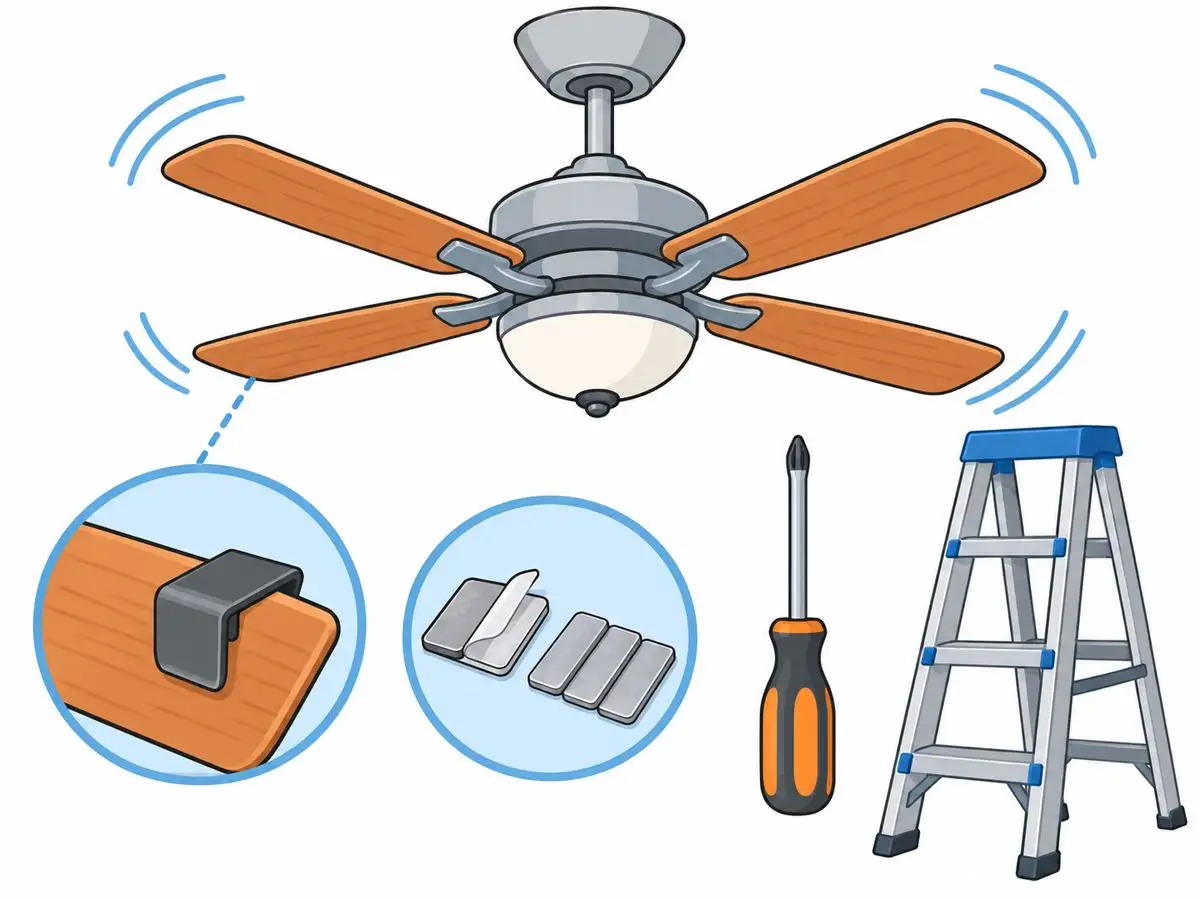
- Stable stepladder, screwdriver, damp cloth, balancing kit (often sold for a few dollars), tape measure
- Call a pro if
- the fan box is not rated for a fan, the ceiling mount moves, the wires are damaged, or you see scorch marks
In this guide
- Power off first
A fan that shakes or ticks makes noise and can loosen over time. This guide shows how to fix a wobbly ceiling fan in about half an hour, using screws, a damp cloth and a balancing kit.
This guide is part of our wider guide to lights, ceiling fans and fixtures.
Safety first
Turn off the fan and its wall switch. Switch off the breaker for that circuit if you plan to touch anything near the canopy. Use a ladder you trust, and have someone hold it. Do not hang on the fan.
Step by step
1. Switch off and let it stop. Wait until the blades are still.
2. Wipe the blades. Dust adds uneven weight. Use a damp cloth on both sides.
3. Tighten the blade screws. Each blade attaches to an arm, called a blade iron, with two or three screws. Snug each screw, but do not strip it.
4. Tighten the blade arm screws. The arms attach to the motor housing. Snug these too.
5. Check the canopy. Lower the cover if it slides. Look at the screws in the mounting bracket. Tighten any that are loose. If the bracket moves, stop and call a pro.
6. Check the downrod. Make sure the set screws holding it to the motor are tight. Look for wobble in the rod itself.
7. Measure blade height. Measure from the ceiling to the tip of each blade. A difference of more than an eighth of an inch means a bent arm. Gently bend it back, or replace it.
8. Turn the fan on low and look. If it still shakes, balance it.
Balance the blades
1. Use the kit. Most kits include a plastic clip and small adhesive weights.
2. Clip it on. Place the clip near the middle of one blade edge. Run the fan and see if the wobble changes.
3. Try each blade. Move the clip to each blade in turn. The blade where the clip reduces shaking is the light one.
4. Mark the spot. Move the clip along that blade until the wobble is smallest.
5. Stick the weight. Remove the clip and put an adhesive weight at that spot, on the top side of the blade in the middle.
6. Run the fan again at each speed.
If you cannot fix it
A fan can wobble because of a bent blade, worn bearing or an unsafe mount. If tightening and balancing do not help, replace the blades as a matched set, or the fan.
Common mistakes
One mistake is tightening only the blade screws. A fan can also wobble from a loose mounting bracket, a loose canopy or a bent blade arm, so check each one in turn. Another mistake is working on a fan that is still turning or still on. Switch it off at the wall and wait until the blades stop completely. Do not stand on a chair or a box. Use a stable stepladder, and ask someone to hold it. If the fan box feels loose in the ceiling, stop and call an electrician.
Related guides
- How to Install a USB Outlet to Replace a Standard Outlet
- How to Replace a Doorbell Transformer When the Bell Goes Silent
- Replace Doorbell Button Safely: Test the Wires First
- How to Install a WiFi Video Doorbell Step by Step
- How to Install a Ceiling Fan Where a Light Fixture Is
- Ceiling Fan Light Not Working
FAQ
Is a wobbly fan dangerous?
It can be, if the mount is loose. A fan can fall. Stop using it if the mount moves.
Do I need a special electrical box?
Yes. A fan-rated box holds the weight and vibration. A standard light box may not.
Why does my fan click?
Look for a loose screw or a touching light kit cover.
Should I oil the motor?
Most modern fans are sealed. Read the manual before adding any oil.
When to call a pro
Call an electrician if you see damaged wires, if the fan trips the breaker, or if the box is not secure.
More from this topic
- How to Replace a Ceiling Fan Pull Chain Switch: Learn how to replace a ceiling fan pull chain switch that is stuck, broken or skipping speeds. Turn off the...
- Ceiling Fan Remote Not Working: Ceiling fan remote not working? Try new batteries, resync the remote, check the receiver and the wall switch....
- How to Replace a Ceiling Fan: How to replace a ceiling fan safely: turn off power, check the fan-rated box, mount the bracket and wire the...
- How to Replace a Light Fixture Safely: Learn how to replace a light fixture safely: turn off power at the breaker, test the wires, connect the new...
- How to Replace a Light Socket in a Lamp or Ceiling Fixture: Learn how to replace a light socket in a lamp or a fixture. Turn off the power, test it, remove the old...
 Electrical BasicsHow to Replace a Ceiling Fan Pull Chain SwitchLearn how to replace a ceiling fan pull chain switch that is stuck, broken or skipping speeds. Turn off the power, open the housing and wire the new switch.
 Electrical BasicsCeiling Fan Remote Not WorkingCeiling fan remote not working? Try new batteries, resync the remote, check the receiver and the wall switch. Simple fixes and when to replace the parts.
 Electrical BasicsHow to Replace a Ceiling FanHow to replace a ceiling fan safely: turn off power, check the fan-rated box, mount the bracket and wire the new fan. Steps, tools and when to call a pro.
 Electrical BasicsHow to Replace a Light Fixture SafelyLearn how to replace a light fixture safely: turn off power at the breaker, test the wires, connect the new fixture and know when to call an electrician.
 Electrical BasicsHow to Replace a Light Socket in a Lamp or Ceiling FixtureLearn how to replace a light socket in a lamp or a fixture. Turn off the power, test it, remove the old socket, wire the new one and test the light safely.