
How to Replace a Doorbell Transformer
Part of: Electrical safety
- Difficulty
- Medium
- Time
- 30 to 60 minutes
- Tools
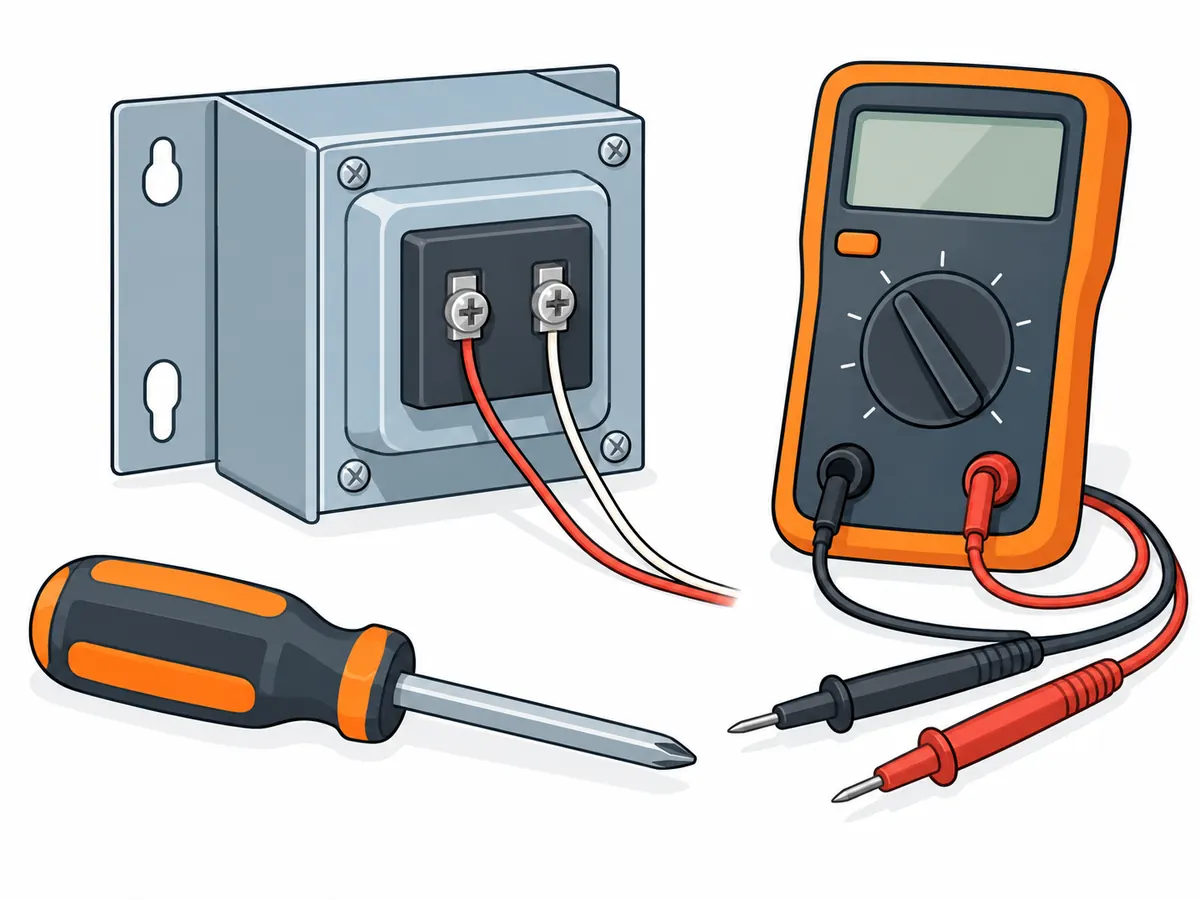
- Multimeter, non-contact voltage tester, screwdrivers, wire stripper, wire nuts, flashlight, new transformer
- Call a pro if
- you cannot find the transformer, the wiring is old or damaged, the transformer is wired inside the panel, or you are not comfortable working with house wiring
In this guide
- Power off first
If the doorbell button does nothing, the chime is silent and the button and chime look fine, the doorbell transformer may have failed. This small box steps house voltage down to a low voltage, usually between 16 and 24 volts, for the bell. Many people can replace a doorbell transformer in under an hour, but part of the job involves house wiring, so safety comes first.
This guide is part of our wider guide to lights, ceiling fans and fixtures.
First, rule out the easy causes
Start with the button, the chime and the wires. See Doorbell not ringing: what to check. Pressing the button should make a click in the chime box on many chimes. A button that is worn, corroded or loose is common. A chime with a broken plunger or a dead battery in a wireless unit are other causes. Only if these check out, test the transformer.
Find the transformer
The transformer is a small metal box, a few inches wide, mounted on or near a junction box. Common places are the basement ceiling, near the main panel, in the attic, in a garage, or inside a closet near the chime. Some are mounted on the side of the electrical panel. Follow the thin doorbell wires from the chime to find it. It has two thin low voltage wires on one side, and two thicker house wires on the other.
Test the transformer
1. Set the multimeter to AC voltage, in a range above 24 volts.
2. Touch the probes to the two low voltage screws on the transformer, without touching other wires. The transformer must be connected, and the breaker on, for this test. This is the low voltage side, so the voltage is small, but the house wiring side is still live. Keep your hands off the thick wires.
3. Read the meter. The reading should match the label on the transformer, often 16 to 24 volts. A reading near zero means the transformer has failed or has no power. A reading close to the label means the transformer is working, and the problem is elsewhere.
Step by step: replace the transformer
1. Turn off the breaker that feeds the transformer. If you do not know which one, turn off the main breaker. Put tape on the breaker.
2. Test the house wires with a non-contact voltage tester to confirm there is no power.
3. Take a photo of the wiring.
4. Disconnect the low voltage wires from the transformer screws. Label them if needed.
5. Disconnect the house wires by removing the wire nuts. The black wire and the white wire from the house connect to the transformer leads.
6. Remove the old transformer by taking out the mounting screws or loosening the locknut that holds it to the junction box.
7. Check the new transformer. Match its voltage and VA rating to the old one or to your chime's requirements. A chime that needs more power than the transformer gives will not ring well.
8. Mount the new transformer in the same place.
9. Connect the house wires. Black to black, white to white, and ground, if there is one, to the ground wire or screw. Twist the wires together and cap them with wire nuts.
10. Connect the low voltage wires to the screws on the new transformer, in the same order as before.
11. Close the box, restore the power and test the doorbell.
Troubleshooting
- Still no ring: check the button and the chime. The chime may have failed.
- Chime hums: a transformer that does not match, or a loose connection.
- Transformer gets hot: the load may be too high, or the transformer may be failing. Turn it off and replace it.
Choosing a replacement
Look at the old label. It lists the input and output voltage and the VA rating. Choose a transformer with the same output voltage and an equal or slightly higher VA rating. If you plan to install a video doorbell, check its power needs first, as many need a higher rating than a standard chime.
Related guides
- Replace Doorbell Button Safely: Test the Wires First
- How to Install a WiFi Video Doorbell Step by Step
- Ceiling Fan Remote Not Working: Quick Fixes Before You Replace It
- How to Replace a Ceiling Fan
- How to Install a Smart Switch
FAQ
How long do doorbell transformers last?
Often many years, but they can fail at any time. Heat and age wear them out.
Can I test the transformer without a multimeter?
Not reliably. A multimeter is a cheap and useful tool.
Is a doorbell transformer dangerous to touch?
The low voltage side is mild, but the house side is live. Treat both sides with care.
Can I use a higher rated transformer?
A slightly higher VA rating is fine, but do not change the voltage.
More from this topic
- Replace Doorbell Button Safely: Test the Wires First: Doorbell button stuck or cracked? Replace doorbell button parts safely, test the low-voltage wires and get...
- Doorbell Not Ringing: What to Check: Doorbell not ringing? Check the button, the chime, the transformer and the batteries in a wireless set. Safe...
- Low Voltage Landscape Lights Not Working: What to Check: Landscape lights not working or dim? Check the transformer, timer, wire connections, bulbs and fixtures on...
- How to Install a USB Outlet to Replace a Standard Outlet: Learn how to install a USB outlet in place of a standard outlet. Check the box and wiring, turn off power,...
- Replace Fluorescent Tube and Starter Safely: Flickering or dead fluorescent light? Replace fluorescent tube and starter safely, match the right size and...
 Electrical BasicsReplace Doorbell Button Safely: Test the Wires FirstDoorbell button stuck or cracked? Replace doorbell button parts safely, test the low-voltage wires and get the chime ringing again.
 Electrical BasicsDoorbell Not Ringing: What to CheckDoorbell not ringing? Check the button, the chime, the transformer and the batteries in a wireless set. Safe steps, tools and when to call an electrician.
 Electrical BasicsLow Voltage Landscape Lights Not Working: What to CheckLandscape lights not working or dim? Check the transformer, timer, wire connections, bulbs and fixtures on low voltage lights. Steps and safety tips included.
 Electrical BasicsHow to Install a USB Outlet to Replace a Standard OutletLearn how to install a USB outlet in place of a standard outlet. Check the box and wiring, turn off power, connect the wires and test the charging ports.
 Electrical BasicsReplace Fluorescent Tube and Starter SafelyFlickering or dead fluorescent light? Replace fluorescent tube and starter safely, match the right size and know when the ballast is the problem.