
Microwave Sparking: What to Do and What It Means
Part of: Appliances
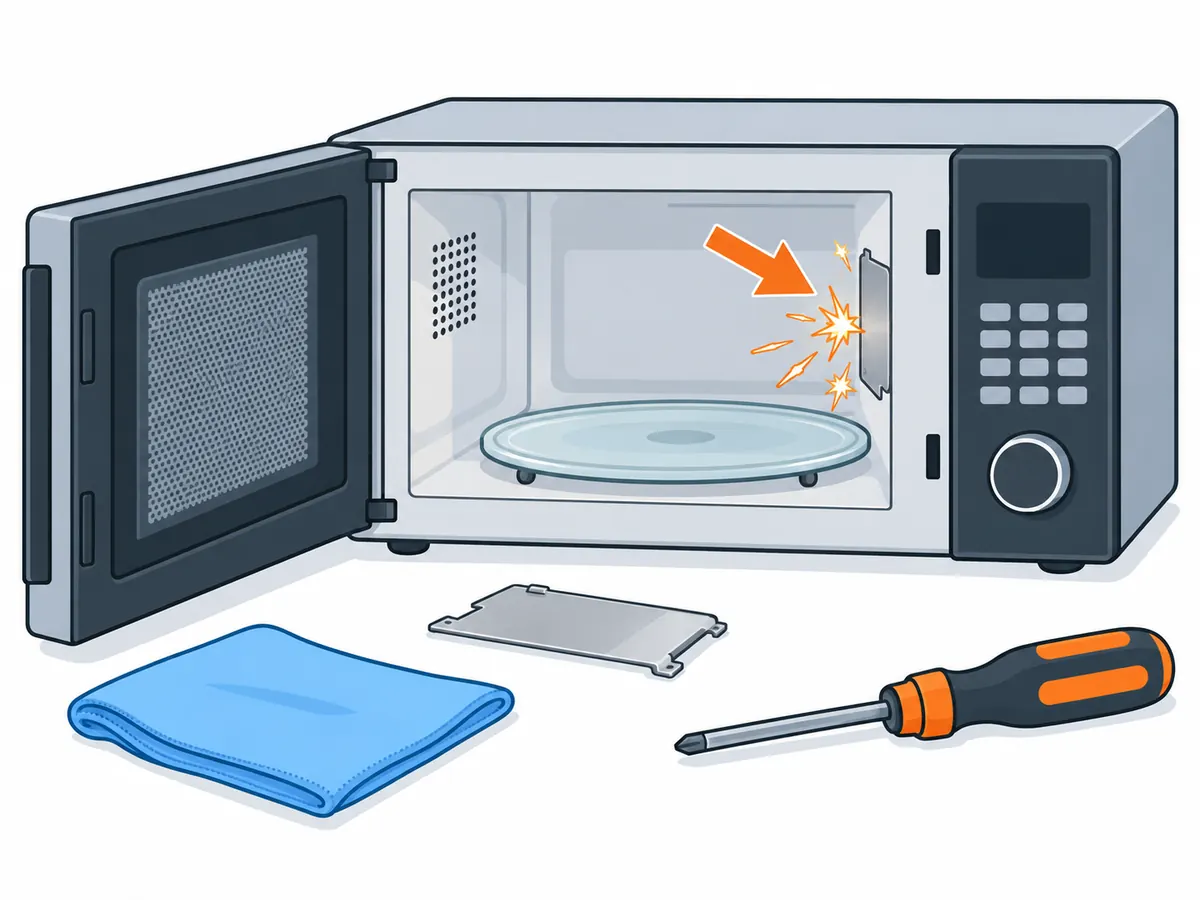
- Difficulty
- Easy to moderate
- Time
- 10 to 30 minutes
- Tools
- Mild soap and a soft cloth, flashlight, replacement waveguide cover if needed
- Call a pro if
- you see burned metal, the sparking continues with an empty microwave or the door is damaged
In this guide
- Power off first
Microwave sparking is a reason to stop the oven right away and find out what is causing it. Sparks in a microwave are alarming and can be dangerous. They happen when metal or a damaged part makes electric arcs in the cooking space. Often the cause is simple, such as foil, a metal-trimmed dish or a burned patch on the wall. Sometimes it points to a part that is failing. This guide explains the common causes, what to do right away and what you can fix yourself.
This guide is part of our wider guide to appliance problems.
Stop right away
If you see sparks, press stop and open the door. Unplug the microwave if the sparks continue or you see smoke. Do not use it until you have found the cause. If there is a fire, keep the door shut, unplug it if you can do so safely, and call emergency services.
Common causes
Metal causes most sparks. Foil, a fork, a twist tie, a dish with metal trim and some takeout containers with metal handles all arc. Very thin gold or silver patterns on plates can too. Even a few grapes placed touching can make sparks. Dried food, grease and burned spots on the inside walls can arc. A damaged waveguide cover, the small panel on the inner side wall, is another common cause. A damaged rack or a metal shelf that touches the wall can also arc.
Step by step: check and clean
1. Unplug the microwave.
2. Remove everything from inside, including the plate and the ring.
3. Look for burned marks, especially on the waveguide cover and the walls.
4. Wipe the inside with a soft cloth and mild soap. Dry it.
5. Check the door seal and the latch area for food or damage.
6. Check the waveguide cover. It is a small panel, often a thin piece of mica, on the side or top wall. If it is burned, torn or has holes, replace it.
7. Put the plate and the ring back.
8. Test with a cup of water for 30 seconds, watching through the window.
Replace the waveguide cover
Waveguide covers are held with a small screw or clip. Unplug the microwave. Remove the screw, lift out the cover and put in a new one of the same shape. Do not try to bend or cut one to fit. If you see burned metal behind the cover, the waveguide itself is damaged. Stop and call a pro.
Signs that point to each cause
Sparks only with a certain dish point to the dish. Sparks when the microwave is empty point to a damaged part. Sparks with a burning smell point to a burned wall or cover. A humming noise with no heat is a different problem. See Microwave not heating: what to check and Microwave turntable not spinning.
When to retire the microwave
If the inside paint is peeling or the metal is exposed, a repair may not be safe or worth the cost. If there are burned spots that keep coming back, a new unit is better. Never run an empty microwave, as it can damage the magnetron.
Prevention
Use only microwave-safe dishes. Cover food with a microwave-safe lid, not foil. Clean the inside often. Cut a hot dog or a sweet potato to allow steam out. Do not run the microwave empty. Check the waveguide cover each year.
Remove splatter
Splatters on the walls and the cover absorb energy and can burn into black spots. Wipe the inside after each use. Heat a cup of water with lemon for a few minutes to loosen stuck food, then wipe it out. Keep the vents clear, and do not block the back of the oven.
Test the new cover and the door
After you put in a new waveguide cover, run a cup of water for one minute and watch through the window. You should see no sparks and no glow. Check that the door closes flat and that the latch clicks. A door that does not close fully can leak energy and cause arcs. If the door looks bent, stop using the microwave.
What not to put inside
Avoid dishes with metal paint or gold rims, travel mugs, plastic containers that are not labeled for the microwave, and anything with a metal twist tie. Even a thin metal edge can arc.
Related guides
- How to Clean a Microwave With Steam: Fast Method for Baked On Splatters
- Circuit Breaker Keeps Tripping When Microwave Runs: Causes and Fixes
- Replace Range Hood Filter: Mesh and Charcoal Types
- How to Replace a Microwave Door Latch
FAQ
Is sparking dangerous? It can damage the microwave and start a fire, so stop at once.
Why does it spark with grapes? Their shape and water content can create a bridge of energy.
Can I use a dish with a gold rim? No. The metal can arc.
Can I fix a burned spot with paint? No. Replace the damaged part or the microwave.
More from this topic
- Microwave Not Heating: What to Check: Microwave not heating? Check the power level, door latch and fuse symptoms, and learn why internal repairs...
- How to Replace Dishwasher Rack Wheels: Learn how to replace dishwasher rack wheels. Remove the rack, pop off the broken wheels, snap in new ones and...
- How to Find an Appliance Model Number and Serial Number: Learn how to find an appliance model number: check the label inside the door, on the back or under the unit,...
- Refrigerator Not Cooling but Freezer Works? 6 Fixes: Refrigerator not cooling but freezer works? Check airflow vents, frost buildup, the fan and the temperature...
- Refrigerator Running Constantly: What It Means: A refrigerator running constantly is usually dirty coils, a weak door seal or a hot location, and sometimes a...
 KitchenMicrowave Not Heating: What to CheckMicrowave not heating? Check the power level, door latch and fuse symptoms, and learn why internal repairs are unsafe. Steps and when to replace it.
 KitchenHow to Replace Dishwasher Rack WheelsLearn how to replace dishwasher rack wheels. Remove the rack, pop off the broken wheels, snap in new ones and make the rack roll smoothly again.
 KitchenHow to Find an Appliance Model Number and Serial NumberLearn how to find an appliance model number: check the label inside the door, on the back or under the unit, and record the serial number for parts and repairs.
 KitchenRefrigerator Not Cooling but Freezer Works? 6 FixesRefrigerator not cooling but freezer works? Check airflow vents, frost buildup, the fan and the temperature setting before you call a repair tech.
 KitchenRefrigerator Running Constantly: What It MeansA refrigerator running constantly is usually dirty coils, a weak door seal or a hot location, and sometimes a real fault. Check the free fixes first.