
Microwave Not Heating: What to Check
Part of: Appliances
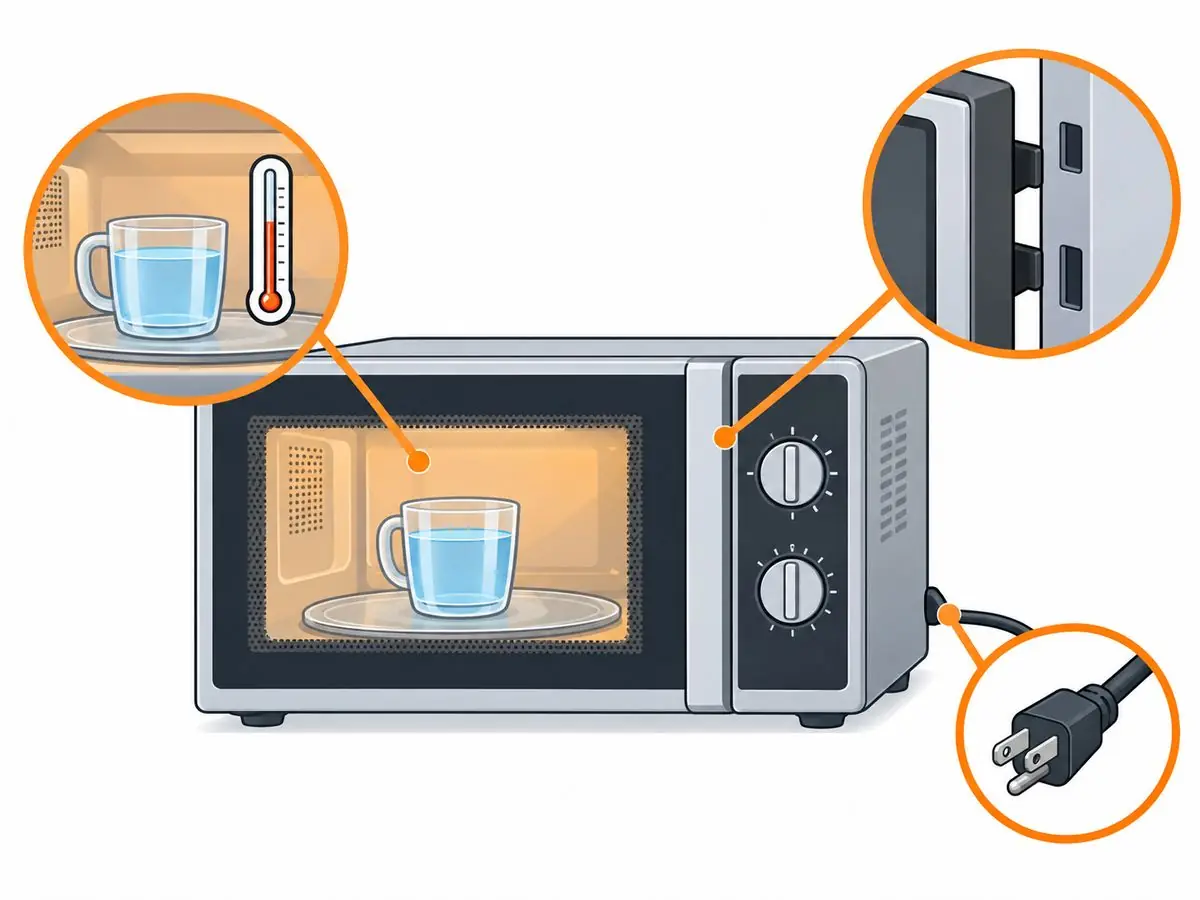
- Difficulty
- Easy for checks, not for repairs
- Time
- 10 to 20 minutes
- Tools
- A microwave-safe cup of water, a plug-in outlet tester, your manual
- Call a pro if
- you smell burning, see sparks, hear loud buzzing or humming without heating or want to open the case. Do not open the case yourself
In this guide
- Power off first
If a microwave not heating is your problem, check the simple things first, then the high-voltage parts a technician should handle. A microwave that runs but does not heat food is frustrating. A few checks can rule out simple causes, but internal parts hold dangerous electrical charge even when the microwave is unplugged. Most repairs are for a technician, and many are not worth the cost.
This guide is part of our wider guide to appliance problems.
Why not open it
A microwave oven contains a high-voltage capacitor that can hold a deadly charge after you unplug it. Do not remove the cover or poke inside. The checks below are all done from the outside.
Step by step
1. Check the power level. Many microwaves have power settings. Make sure it is not on a low or defrost level.
2. Check the settings. Some models have a "demo mode" or "sabbath mode" that runs the fan and light without heating. Check the manual for how to turn it off.
3. Check the outlet. Plug a lamp or an outlet tester into the same outlet to confirm it works. Microwaves should be on their own circuit. See Outlet not working in one room: how to fix it.
4. Run a water test. Put a microwave-safe cup of water in the microwave and run it for one minute. Do not run the microwave empty. The water should be hot. If it is not, the heating system is not working.
5. Check the door. Make sure the door closes fully and the latch is not broken. The microwave will not heat if the door switches are not engaged.
6. Listen. A hum or buzz with no heat can mean the magnetron or diode has failed. A rattle or grinding can mean the turntable or the fan.
7. Check for tripped breakers. See How to reset a tripped breaker.
Likely causes inside
- A failed magnetron, the part that makes the microwaves.
- A bad high-voltage diode or capacitor.
- A faulty door switch.
- A blown thermal fuse.
These parts must be tested and replaced by someone trained to discharge the capacitor safely.
Repair or replace?
Many countertop microwaves cost little to replace, and repairs can approach that price. Built-in or over-the-range models cost more, so a repair quote may make sense. Ask a technician for an estimate before you decide.
Habits that protect your microwave
Wipe splatters from the door seal so the door closes fully. Do not run it empty, and do not use metal or foil unless the manual allows it. Do not slam the door, since the latch switches are small and wear out. If your microwave is old and you hear louder noises than before, plan to replace it. A simple note of the model number and the date you noticed the problem helps if you ask a technician for a quote.
Safe habits while you troubleshoot
Keep metal, foil and sealed containers out of the microwave. Do not use it if the door does not close tightly. Do not stand directly in front of it for long while it runs. If it sparks, stop it right away and unplug it. Sparks often come from a damaged cavity coating or from food debris, so wipe the cavity, but do not use it if the paint is flaking and bare metal shows.
Related guides
- Dishwasher Will Not Start: What to Check First
- How to Clean a Microwave With Steam: Fast Method for Baked On Splatters
- Circuit Breaker Keeps Tripping When Microwave Runs: Causes and Fixes
- Oven Not Heating: What to Check
- Microwave Turntable Not Spinning: Causes and Easy Fixes
FAQ
Is it safe to use a microwave that hums but does not heat?
No. Stop using it until it is checked.
Why does my microwave turn on but the plate stays cold?
Microwaves heat food, not plates, so the plate may not feel hot. Use the water test.
Can I replace the fuse myself?
Not safely. The fuse is inside the case near high-voltage parts.
How long do microwaves last?
Many work for years, but heavy use and wear on the door can shorten life.
More from this topic
- Oven Not Heating: What to Check: Oven not heating? Check the breaker, the bake element and the igniter on a gas oven. Safe steps, tools and...
- How to Replace a Microwave Door Latch: Learn how to replace a microwave door latch hook: unplug the unit, swap only the door-side hook and know when...
- Microwave Sparking: What to Do and What It Means: Microwave sparking inside? Learn the common causes, from metal and foil to a damaged waveguide cover, and...
- What to Check Before Buying a Used Appliance: What to check before buying a used appliance: age from the serial number, a full plug-in test, rust and leak...
- Dishwasher Will Not Start: What to Check First: Dishwasher will not start or hums and stops? Check the door latch, power, control lock and timer with simple...
 KitchenOven Not Heating: What to CheckOven not heating? Check the breaker, the bake element and the igniter on a gas oven. Safe steps, tools and when to call an appliance technician.
 KitchenHow to Replace a Microwave Door LatchLearn how to replace a microwave door latch hook: unplug the unit, swap only the door-side hook and know when to stop and call a technician.
 KitchenMicrowave Sparking: What to Do and What It MeansMicrowave sparking inside? Learn the common causes, from metal and foil to a damaged waveguide cover, and when to stop and call for service.
 KitchenWhat to Check Before Buying a Used ApplianceWhat to check before buying a used appliance: age from the serial number, a full plug-in test, rust and leak signs, parts availability and red flags.
 KitchenDishwasher Will Not Start: What to Check FirstDishwasher will not start or hums and stops? Check the door latch, power, control lock and timer with simple steps before you call a repair person.