
Outdoor Light Timer: How to Install One Safely
Part of: Electrical safety
- Difficulty
- Easy
- Time
- 10 to 20 minutes
- Tools
- Outdoor-rated timer, weatherproof cover, screwdriver, a dry cloth
- Call a pro if
- you want a wired switch in the wall, the outlet is damaged or there is no ground fault protection
In this guide
- Power off first
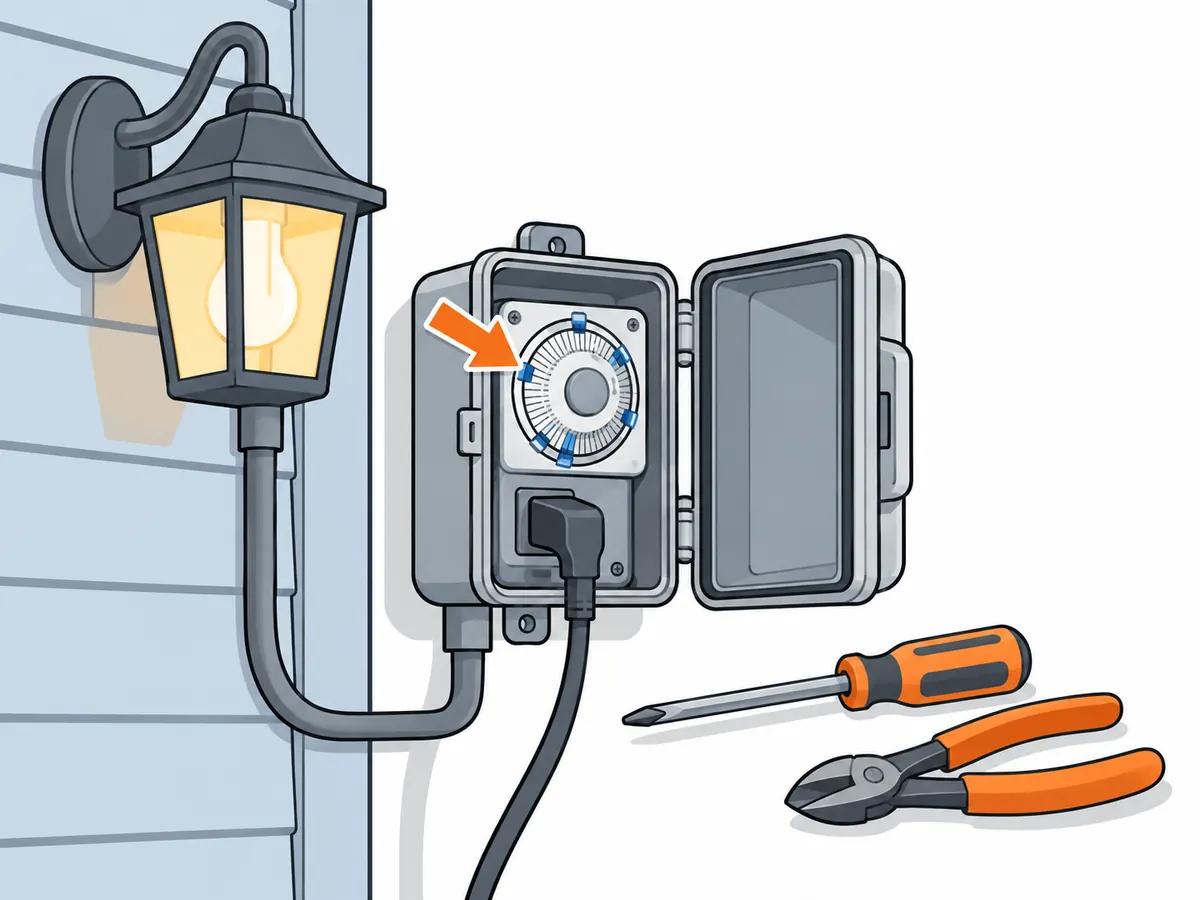
An outdoor light timer turns your lights on and off for you. It saves energy, adds safety and helps your home look lived in when you are away. The simplest timers plug into an outdoor outlet and then the lights plug into the timer. This guide shows how to choose and set up a plug-in timer safely and when to ask an electrician about a wired switch.
This guide is part of our wider guide to lights, ceiling fans and fixtures.
Pick the right timer
Choose a timer rated for outdoor use. It should have a weather-resistant case and a cover. Check the load rating on the label and make sure the total power of the lights does not exceed it. LED lights use little power, but check anyway. There are three common types: a mechanical dial, a digital timer and a photocell that turns on at dusk. Some have both a photocell and a timer.
Check the outlet
The outlet should be a ground fault protected outdoor outlet with a weatherproof cover. Press the test button to check that it works. See GFCI outlet will not reset and Outdoor outlet cover: how to install. Do not plug a timer into a damaged or loose outlet. See Outlet plug loose: how to fix.
Step by step
1. Unplug the lights and set them aside.
2. Read the timer's manual for the setup steps.
3. Plug the timer into the outdoor outlet.
4. Set the time of day. On a digital timer, press the clock button and set the time.
5. Set the on and off times, or select the dusk to dawn mode.
6. Plug the lights into the timer.
7. Test the setting by turning on the manual mode.
8. Close the outlet cover so that the cord passes through the opening designed for it.
9. Check the cord and keep the plugs off the ground, where water can collect.
10. Check the result that evening.
Keep connections dry
Plug connections outside should be protected from rain. Use an in-use cover that closes over the plug. Do not let the plug sit in a puddle. Use a drip loop: let the cord hang down a little below the outlet before it rises, so water drips off the bottom of the loop. Do not tape plugs together with ordinary tape.
Signs that point to each cause
Lights that do not come on may mean the outlet has tripped, or the timer is set wrong. Lights that come on at the wrong time have a clock set wrong, or a power outage reset the timer. Lights that flicker may be on an overloaded timer. A timer that gets warm is overloaded. A photocell that stays off may be shaded. Move it or clean the sensor.
Choosing the schedule
For safety lights, dusk to dawn is a simple choice. For decoration, try on from dusk until bedtime. For holiday lights, set a daily schedule and change it with the season. Check the timer after a power outage, as some lose the clock.
Prevention
Test the timer when the clocks change. Replace the timer if the case cracks or the cord frays. Do not plug heavy appliances into a light timer. Check the outlet's reset button each season. Keep ice and snow away from the plugs. See How to install a motion sensor light for another way to light an entrance, and Extension cord safety for homeowners.
Battery backup
Some timers keep their settings through a short outage with a small battery. Replace that battery each year. If the timer has a battery door, check that it closes tightly, so water cannot enter. A timer without a backup needs resetting after an outage, so keep the manual where you can find it.
Troubleshooting a timer that will not switch on
Check that the outlet has power by plugging in a small lamp. Press the reset button on the outlet if it has one. Check the timer's clock, the AM and PM setting and the pins on a mechanical dial. Make sure the manual switch is not set to off. If the light still does not come on, try the lights in a different outlet to see whether the lights or the timer failed.
Related guides
- How to Install Plug-In Under-Cabinet Lighting in Your Kitchen
- Outdoor Light Fixture Filling With Water: Causes and How to Fix It
- How to Replace a Light Fixture Safely
- How to Remove a Stuck or Broken Light Bulb Safely
FAQ
Can I use an indoor timer outside? No. Use one made for outdoor use.
Do LED lights work on a timer? Yes, but check the load rating and whether the timer needs a minimum load.
Why did my lights go off early? The clock or the schedule is set wrong.
Should I use a photocell? It is a handy option, as it follows sunset through the year.
More from this topic
- How to Replace a Light Switch Safely in 20 Minutes: How to replace a light switch safely: turn off the breaker, test for power, swap the switch and test it....
- How to Replace an Outdoor Light Fixture: How to replace an outdoor light fixture: turn off power, test, swap the old fixture and seal against water....
- Replace Photocell Sensor on an Outdoor Light: Outdoor light on all day or never on? Test and replace photocell sensor parts safely for reliable dusk to...
- Occupancy Sensor Switch: How to Install One Safely: Want lights that turn on when you enter? Install an occupancy sensor switch safely: check the wiring, neutral...
- How to Cap Electrical Wires Safely With Wire Nuts: Learn how to cap electrical wires: strip the right length, twist the wire nut on tight, and make connections...
 Electrical BasicsHow to Replace a Light Switch Safely in 20 MinutesHow to replace a light switch safely: turn off the breaker, test for power, swap the switch and test it. Steps, tools and when to call an electrician.
 Electrical BasicsHow to Replace an Outdoor Light FixtureHow to replace an outdoor light fixture: turn off power, test, swap the old fixture and seal against water. Steps, tools and when to call an electrician.
 Electrical BasicsReplace Photocell Sensor on an Outdoor LightOutdoor light on all day or never on? Test and replace photocell sensor parts safely for reliable dusk to dawn lighting. Steps and safety tips included.Electrical BasicsOccupancy Sensor Switch: How to Install One SafelyWant lights that turn on when you enter? Install an occupancy sensor switch safely: check the wiring, neutral wire need and set the timer.Electrical BasicsHow to Cap Electrical Wires Safely With Wire NutsLearn how to cap electrical wires: strip the right length, twist the wire nut on tight, and make connections that stay safe in the box.